Adsense

ラベル avatar の投稿を表示しています。 すべての投稿を表示

2014年9月4日木曜日

みっくみくしました

お久しぶりです><
8月30日-31日にかけて勝手にミクちゃんのお誕生日お祝いパーティーしてました。

secondlife-postcard (18)
左から
・七葉1052式ミク
・ままま式あぴみく大人バージョン
・Tda式ミク アペンド
・ラブ式ミク
すべて MMD モデル(改造・非商用再配布化)を Collada に変換、リグしなおして SL 用フルメッシュアバターに改造したものです。

期間限定配布でしたが多くの方に楽しんでいただいたようです。m(_ _)m

今回は表情 HUD なしですが、
・タイピングに合わせた口バク機能
・ランダムなまばたき
・ランダムな瞳きょろきょろ
が実装されていました。

8月30日深夜から8月31日のみくちゃんのお誕生日を勝手にお祝いしました。

スカートのウェイトが粗いのはご愛嬌><

うちの SIM には珍しい SIM フル状態に。

お祝いパーティー会場は、ぷーちゃん作。当日のパーティーの DJ もやっていただきました。ダンスマスターはくろみちゃん。

また来年、ミクちゃんの誕生パーティーできあらいいなぁ~
See you again!

2013年9月17日火曜日

Challenge to setup rigged mesh

Still I need to understand something…

But I learned the following points from importing work…

  • Before importing pmx, get rid of all joints and rigid bodies. You don’t need them and to be simple work in blender.
  • Before importing pmx, you had better change Japanese material’s name to English. You could edit in blender but sometime uploading failed to secondlife (parse error).
  • mmd_tools helps us for importing and editing pmx. We should add this on blender. https://github.com/sugiany/blender_mmd_tools
  • Avastar helps not only secondlife born(armature) parenting but also exporting collada. If you would like to separate object and make seamless among them,  need “Weld Edge Normals” option in Avastar exporter. About weld edge normals, please see this post.  http://meshdolls.blogspot.jp/2013/04/avastar-weld-edge-normals.html
  • One object should have 8 materials or less. You need to separate pmx mesh by “materials” with using mmd_tools “Separate by materials” in tool shelf. “Separate by materials” keeps armature modifier, materials, vertex group and shapekey information. No collapse meshes by shapekey (morph) incorrect data by this approach.
  • In editing, you should always pay attention on shapekey. Basis! Basis! Basis!
  • When you want to separate mesh more, don’t delete vertices. Create new material, assign vertices, copy material data from original to new one and “Separate by materials” in mmd_tools. If you just want to delete, you don’t need to copy material data to new one.
  • When you want to copy mesh, Avastar custom mesh tool “Freeze Mesh” helps you. Getting rid of shapkeys but keeping morphed mesh, armature modifier, material (same name of original) and vertex group. To make facial expressions mesh, this freeze mesh is useful.
  • When joining meshes to one, you should consider its materials naming. If you would like them to be different “side” in secondlife, you should differentiate material’s name. Don’t change its name directly. Make new material, assign all vertices and copy material’s data from original to new one.
  • “Apply scale and rotation” – Avastar exporter does it by option but when pmx model scale and size changed for avastar or skelton base, apply them.
  • Make T-Pose (rest pose) by using pmx born(armature) pose mode. You need to add armature modifier more and apply original one. Please see this page for how-to.  http://nixart.wordpress.com/2013/03/28/modifying-the-rest-pose-in-blender/
  • PMX model has many “doubles” vertices. Mesh tools [Remove] [Remove Doubles] helps you reducing vertex count and getting rid of line on surface in the same material.
  • PMX model doesn’t have lining faces backing for clothes therefore you should duplicate faces and invert normals of them. Please see this post. http://meshdolls.blogspot.jp/2013/01/making-liner-normals-inside.html
  • Secondlife doesn’t support custom shapekey (morphing). We can’t export facial expressions by shapekeys to secondlife. So prepare facial expression meshes (materials) and control transparency by LSL(Linden Script Language). Please see this post. http://meshdolls.blogspot.jp/2013/04/avastar-weld-edge-normals.html
  • Modify secondlife  born skeleton or avastar armature. Move armatures to same position of PMX armature. head, neck, collars, shoulders, elbows, wrists, chest, torso, pelvis, hips, knees and ankles are key armature points. Avastar armature is so special therefore see this video. https://www.youtube.com/watch?v=mL4X1AlMtVU
  • Don’t use Avastar parent tool [Rigging] [with Weight Copy] nor blender parent [With automatic weight]. PMX model already has weight data. For parenting to armature, you had better use blender parenting(Ctrl+P) and [With empty groups].
  • Modifier “Vertex Weight Mix” can add PMX vertex group weight to secondlife armature vertex group. Especially for body parts, you can get so excellent weight from original model mesh/vertex groups.
  • In uploading collada file to secondlife, use [with joint position] option for body, especially including elbows and knees. Because secondlife armature’s joint positions are changed by modified for PMX born style.
  • Some parts should not be used the above [with joint position] option in uploading collada. For example, changing side’s alpha scripted objects like “face and eye”. I don’t know why but we see flick model in-world.
  • About image (picture) file, you would need to convert files to JPEG. TGA and PNG has alpha channel and secondlife sometimes can’t handle them correctly.

In addition, it takes over 2 years to understand/learn the above by try and errors. Still I feel I don’t know blender and 3DCG thoroughly. I really appreciate that Avastar Gaia Clary youtube channel always gives me many hints https://www.youtube.com/user/gaiaclary and so many blender tutorial videos and blog posts also help me.

Thanks, Enjoy and good luck

2013年7月31日水曜日

Mercury Lamp Cosplay

Original pmd mesh head created by Kakomiki sama.
Of course and I’m afraid that it’s not for sale.
Mercury Lamp (suigintou) cosplay Mercury Lamp (suigintou) cosplay Mercury Lamp (suigintou) cosplay Mercury Lamp (suigintou) cosplay
Costume by YOHKIHI sama - "GOTHIC DOLL"
With M3 Anime Head by UTILIZATOR.
Mercury Lamp(suigintoh) at Mad City Mercury Lamp(suigintoh) at Mad City

2013年4月11日木曜日

UTILIZATOR – M3 Mesh Anime Head

PMX imported model? Non non, it’s mesh anime head “M3” from UTILIZATOR!

secondlife-postcard (42)
(Head only. Miku costume by GANTZ)  with Wind Light, light/shadow and DOF rendering options

UTILIZATOR – M3 Mesh Anime Head in marketplace
https://marketplace.secondlife.com/p/UTILIZATOR-M3-Mesh-Anime-Head/4697296

secondlife-postcard (43)
With PMX imported mesh doll.(Applied Wind Light setting, without light and shadow)
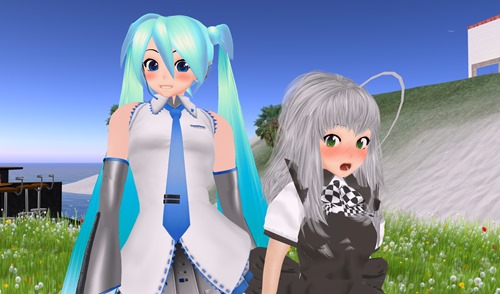
secondlife-postcard (44)
With another M3 Head avatar. (Applied Wind Light setting, without light and shadow)

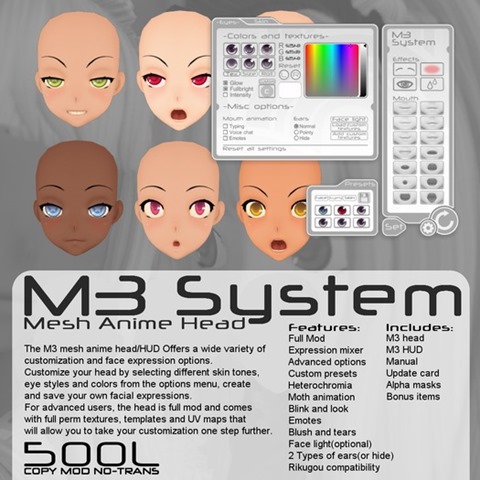
Realistic mesh head (hybrid avatar) “Nea” is also amazing work and this M3 Mesh Anime Head has so many facial expression patterns controlled by HUD.
vp5

This M3 Mesh Anime Head shows us high potential of mesh works in secondlife, I think, as well as Nea gave us.

UTILIZATOR creator’s blog and news
UTILIZAOR BLOG
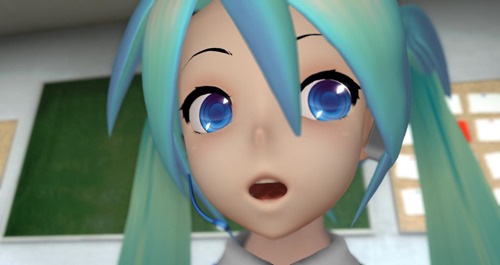
secondlife-postcard (49)
(deferred rendering – light, shadow and DOF – close-up)
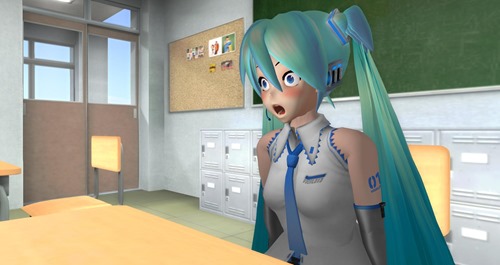
secondlife-postcard (46)
Changed eye size, blushing and opening mouse

secondlife-postcard (45)
Imported pmx mesh doll GUMI by Mamama-san and M3 Mesh Anime Head + Edelweiss school blazer (Only Wind Light setting)

*Edelweiss* http://moekakohime.blogspot.jp/

Enjoy!!! ウインク

2013年3月21日木曜日

Nea - Hybrid Avatar (skin and mesh head)

As I introduced in this blog, mesh head and skin - Hybrid Avatar - "Nea" is released in Skin Fair 2013 in Second Life.


I think this fabulous mesh head and skin opens new era for secondlife mesh avatar. Still it's a starting point and less facial expressions but I believe so many creators will be heading for high quality mesh avatar. (I MUST SAY SHE HAS RICH FACIAL EXPRESSIONS - PLEASE SEE THE FOLLOWING URL-FLICKR.COM)
http://www.flickr.com/photos/snumaw/sets/72157633063375895/

I made the following video with Nea mesh head and MikuMikuDance motion - Cyber Thunder Cider -. This avatar gives me a lot of motivation for making video.


Enjoy, ;)